2026-10-28
Email-First Signup: How We Closed Account Enumeration on a Payments Dashboard
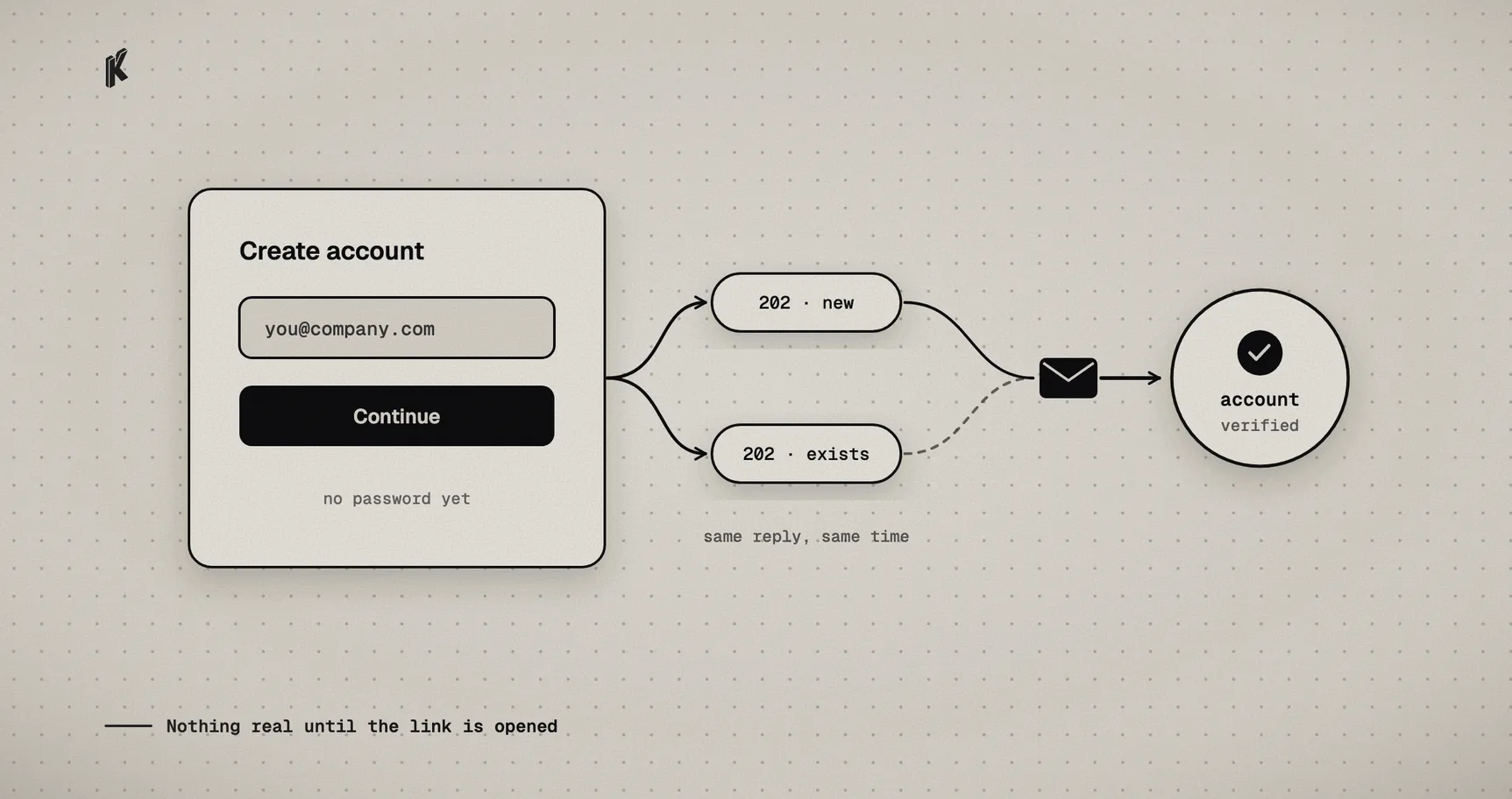
Signup is the least glamorous screen in a payments product, and one of the easiest places to leak something. Two problems in particular show up in almost every "email and password" form:
- It tells strangers who your customers are. Type an email, get "this address is already registered", and now anyone can check a list of addresses against your user base. That's account enumeration, and it's the first step of most targeted phishing.
- It creates accounts nobody has proven they own. Someone signs up with an address that isn't theirs, sets a password, and starts configuring things. In a payments product, "things" can include where money goes.
We just rebuilt signup in Klap App and Klap Link around one idea: nothing real happens until the person proves they control the mailbox.
Ask for the email first, and always answer the same way
Signup now takes only an email address. For any valid address, new or already registered, the API answers with the same 202 Accepted, in the same amount of time.
The "same amount of time" part is easy to miss. A form can return identical text for new and existing addresses and still leak through timing: looking up the account, writing a token and sending a mail is work a missing account skips. So all of that runs in the background, after the response has gone out.
What arrives in the inbox is what differs:
- A new address gets a single-use link to finish creating the account.
- An existing address gets no token. In Klap Link it gets a "you already have an account" mail, and in Klap App it gets nothing at all. Either way, there's nothing in it a stranger could use.
Forgot-password works the same way. It used to send an identical message either way, but an existing account still took longer to answer. That work now runs after the response too.
Create the account only when the link is opened
The account doesn't exist until the link is used. When the person opens it and sets a password, the user and their organization are created in the same database transaction that consumes the token, already verified.
That removes a whole category of half-finished state: no accounts in limbo, no unverified users with a password, no cleanup job for signups that never came back. A weak password, a refused request or a busy password hasher doesn't burn the token either, so a person can just try again.
For accounts that predate this, or right after someone changes their email, the rule is deny by default. An account without a confirmed email gets 403 email_not_verified on every action except a short, explicit allowlist (who am I, resend the confirmation, sign out), and the dashboard shows only a "confirm your email" screen. In Klap Link, the payment pages of an organization whose owner isn't verified answer 404 before anything else runs. In Klap App, live mode stays locked until the email is confirmed.
A password policy you can see
New passwords need at least 12 characters and a mix of character types (Klap App also takes any password of 16 or more). Common passwords and anything taken from your own email address are rejected. The signup and reset forms show a live checklist that mirrors the server's rules exactly, plus a "passwords match" line, and the submit button stays disabled until both pass. Nobody finds out a rule exists by getting a vague error after hitting submit.
Existing passwords still log in. A policy change shouldn't lock people out of their money.
Small things that add up
- Mail budgets per mailbox. In Klap App, signup links have a cooldown and an hourly cap, counted per real mailbox, so
+tagsand Gmail dots don't multiply it. - Blocked signup domains. A configurable list of email domains is refused at password signup and beta requests, to cut spam. Google sign-in skips it, since the provider already vouches for the address.
- Closed beta, confirmed first. A beta request only reaches our team after the person confirms their email. Approval creates the account without a password and sends a one-time link to set one. No temporary passwords travel by email.
- Sessions that survive privacy browsers. Klap Link sessions were bound to a fingerprint that included
Accept-Language, and Brave varies that header between requests, which silently logged people out. The fingerprint now uses only the user agent.
The checklist
If you're building signup for anything that touches money, this is the short version:
- Accept only an email first, and answer identically, in identical time, whether or not an account exists.
- Do the slow work after responding.
- Create the account when the emailed link is used, in the same transaction that consumes the token.
- Deny by default for unverified accounts, with an explicit allowlist.
- Show the password rules up front, enforced identically on client and server.
- Rate limit mail per mailbox, not per raw string.
- Never email a password.
None of this is exotic. It's just easy to skip when signup is the screen nobody wants to work on.
Klap is a non-custodial payments API: money goes straight from the payer to you on-chain. The non-custodial guide explains what that means, and the rest of the security work happens in the payment verification layer.