2027-01-05
How to Accept USDC in Person With a QR Code
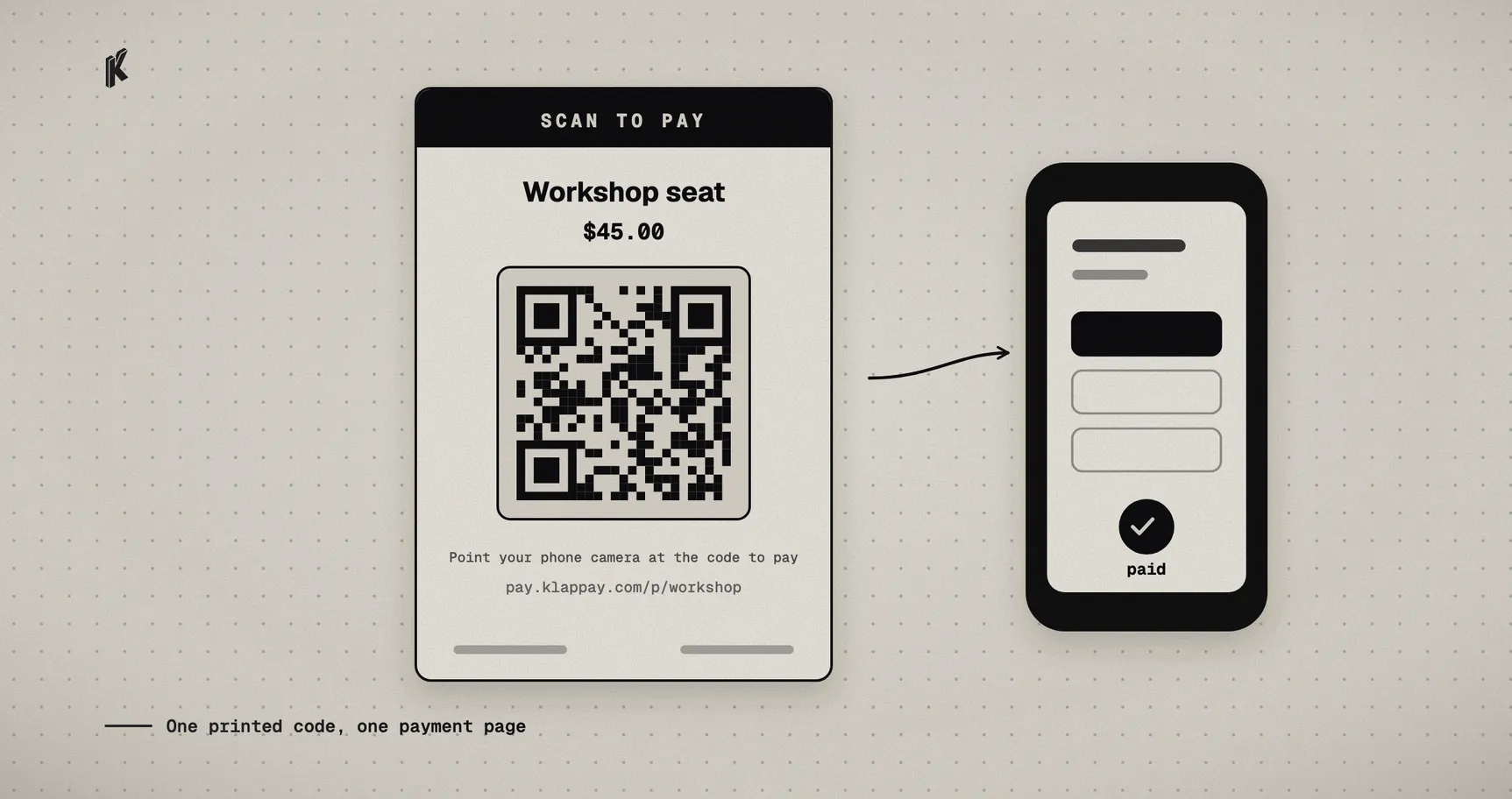
A payment link works perfectly well in a chat or an email. At a table at a conference, a stall at a weekend market or the counter of a small shop, nobody wants to type a URL. They want to point a phone at something.
Every Klap Link now has a QR code, and you can download it as an A4 poster ready to print. The code opens the same payment page as the link, so a sale made from a printed sheet works like one made from a shared URL: the buyer pays from their own wallet, the money settles to yours, and the payment shows up in your dashboard with a receipt sent to the buyer.
Where to find it
Open a link and look at its share bar. Show QR code opens a dialog with the code and three downloads:
- PNG, about 1024 pixels wide, for a slide, a screen at your booth or a social post.
- SVG, a vector file for a designer or for printing larger than A4.
- Download print poster, an A4 PDF with the code, the title and the price.
The same button is on each row of your links list, and in the dialog that appears right after you create a link, so you can go from a new link to a printed sheet without leaving the page.
The code is generated locally in your browser. Your payment URL never goes to a third-party QR service for conversion into an image.
What the poster shows
The poster's layout is meant for a table or a wall, readable from a step away. From top to bottom:
- A dark band that says SCAN TO PAY.
- The Klap Link logo and your link's title, up to two lines.
- The price the buyer pays. If you pass the fee on to the buyer, the price already includes it, so the number on paper matches the number on the screen. A subscription link shows the interval, like
/month. - The QR code.
- One line for people who've never scanned a payment code: "Point your phone camera at the code to pay."
- The link's address in plain text, for a phone that won't scan.
- The payment methods the link accepts, and "Secure checkout by Klap Link".
If the link is still in test mode, the band says TEST MODE instead, and scanning opens a test checkout. Add your payout wallet in Settings before you print. Otherwise you'll have a stack of posters that can't take real money.
What happens when someone scans
The code holds an ordinary web address. Any phone camera opens it, with no wallet app needed for the scan itself. The buyer lands on the payment page and sees the title and the price, then picks a token and network from the ones you accept and pays from the wallet on their phone.
A QR code with just a wallet address in it is easy to make (Klap has a free generator for one), but it gives you no information afterwards. You don't know who paid, you check a block explorer to see if the money arrived, and many wallets ignore the amount written into the code. Behind a Klap Link code there's a payment page with your price on it, a receipt for the buyer and a dashboard entry for you once the payment confirms.
On a fast network, confirmation usually takes seconds. The buyer can show you the confirmation screen on their phone, and you see the order in your dashboard at the same moment. How crypto payment confirmations work covers what "confirmed" means on each network.
Selling things that run out
If you're selling a fixed number of something, like event seats, a print run or a box of merch, set a stock on the link. Each buyer who starts paying reserves a unit until they finish or the checkout expires, so two people scanning the last poster at the same time can't both buy the last item. When stock runs out, the page says the link is no longer available. Selling limited stock with a payment link goes through it.
The same applies when an event ends. Archive the link and the posters stop taking payments. While a link is archived, its QR button is turned off, and reactivating the link brings it back.
A few practical points
One link per price. The poster prints one price. A stall with three products needs three links and three posters, or one product page that bundles them.
The buyer pays the network fee. Sending USDC costs a small amount of gas, paid in the network's own coin. On most networks it's a fraction of a cent, and on Arc it's paid in USDC itself. A buyer whose wallet holds USDC and nothing else may not be able to send it. Does USDC have gas fees? explains which coin each network needs.
Not everyone has a wallet. A QR poster for USDC sits next to your card reader, not in place of it. It's especially useful at crypto events and with customers who already hold stablecoins and would rather pay that way.
To try it, create a link, open it in test mode, download the poster and scan it with your own phone before you print a stack.